
Results
The results command family works on existing local AgentV run workspaces and index.jsonl manifests. Use it after an eval run to inspect failures, validate manifests, export artifact layouts, combine/delete local run workspaces, or generate a shareable HTML report.
Remote result repository exchange is intentionally not part of agentv results. New eval runs publish completed artifacts to a configured results repo or branch; auto_push: true additionally pushes that branch to the remote. Manual remote status and sync are Dashboard/API workflows. See Dashboard Remote Results for configuration and sync behavior, and WIP checkpoints for recovering in-progress runs before final publish.
For the canonical run output structure, file roles, and integration contract, start with Result Artifact Contract.
Subcommands
Section titled “Subcommands”| Subcommand | Purpose |
|---|---|
results report | Generate a self-contained static HTML report from an existing run workspace |
results export | Materialize or normalize the artifact workspace structure for a manifest |
results combine | Combine partial local run workspaces into a new local run workspace |
results delete | Delete one or more local run workspaces |
results summary | Print aggregate metrics for a run |
results failures | Show only failing cases |
results show | Display case-level rows from a run workspace |
results validate | Validate that a workspace or manifest resolves correctly |
results combine writes a new direct run workspace under .agentv/results/<run_id>/ and records the selected experiment label in summary.json and index.jsonl metadata. If the source runs span multiple experiments, pass --experiment <name> for the new combined run; AgentV does not silently invent a mixed-experiment label.
results report
Section titled “results report”The results report command turns an existing run workspace or index.jsonl manifest into a self-contained HTML report for sharing, inspection, and human review.
agentv results report <run-workspace-or-index.jsonl>Examples:
# Generate report.html next to the run manifestagentv results report .agentv/results/2026-03-14T10-32-00_claude
# Use an explicit output pathagentv results report .agentv/results/2026-03-14T10-32-00_claude/index.jsonl \  --out ./reports/human-review.html
What it shows:
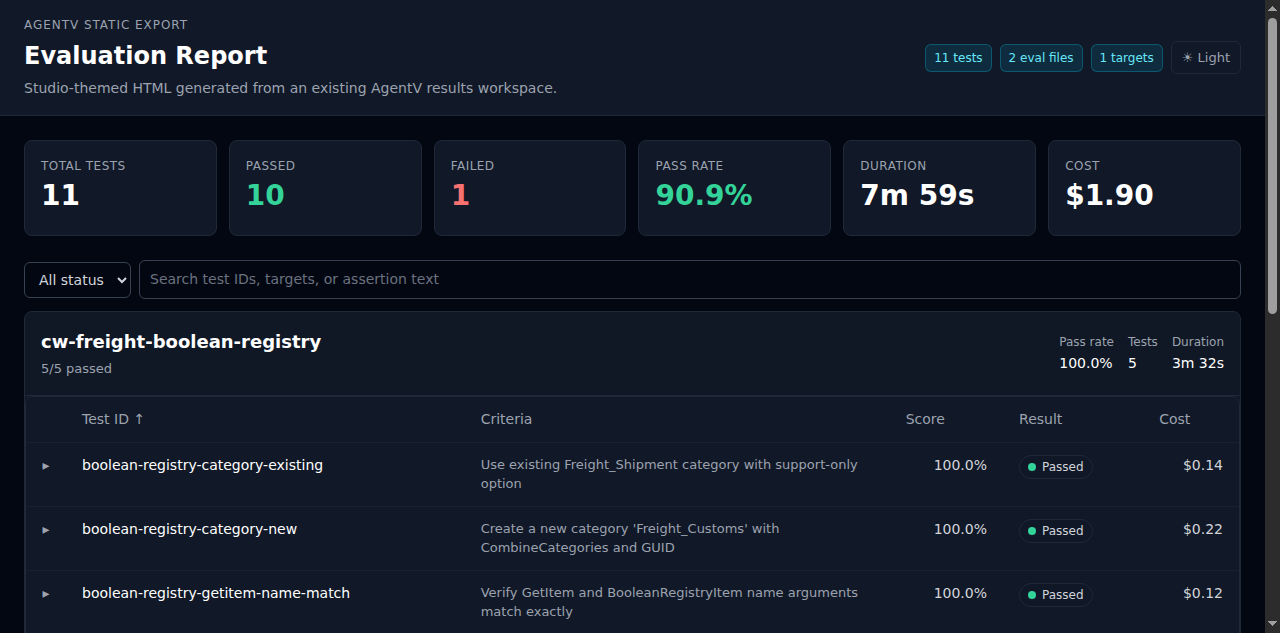
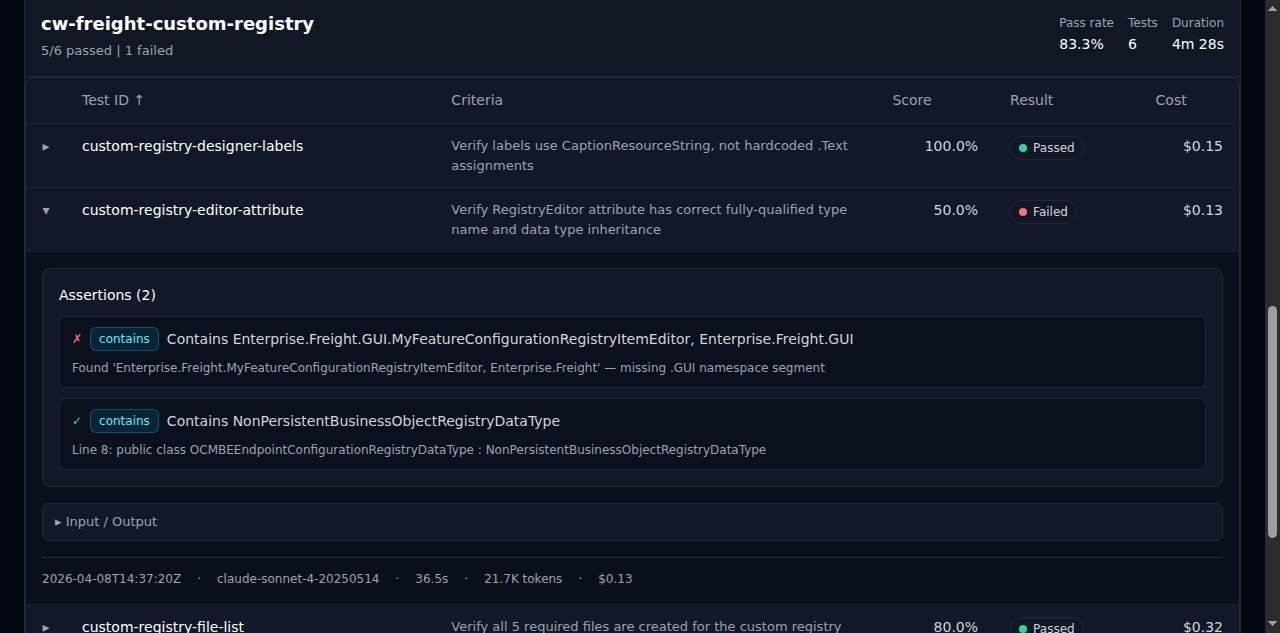
- Summary stats — total tests, passed, failed, pass rate, duration, and cost
- Eval file groups — test cases grouped by eval file with pass rate, test count, and duration
- Expandable details — unified assertions with pass/fail indicators and type badges, collapsible input/output
- Criteria column — shows the test prompt or description inline for quick scanning
Publish a static report with GitHub Pages
Section titled “Publish a static report with GitHub Pages”The generated file is self-contained HTML: no Dashboard server, API endpoint, or external asset host is required after it is written. That makes it a good fit for public result repositories served by GitHub Pages.
One minimal publication workflow is:
# 1. Run an eval and sync or copy the run workspace into your public results repo.agentv eval evals/demo.eval.yaml --output .agentv/results/demo-live
# 2. In the public results repo, render the report into the Pages source directory.agentv results report .agentv/results/demo-live --out docs/index.html
# 3. Review the generated HTML before publishing.grep -RInE 'sk-[A-Za-z0-9]|Bearer |localhost|127\.0\.0\.1|/home/|/Users/|/tmp/' docs/index.html
# 4. Commit the run artifacts and docs/index.html, then enable GitHub Pages#    for the repository's docs/ directory or the branch used for Pages.git add .agentv/results/demo-live docs/index.html README.mdgit commit -m "docs(results): publish static AgentV report"git push
Use --out docs/<name>.html when a repository should publish multiple runs. Link those files from the result repository README so readers can browse a dashboard-like report from GitHub Pages instead of running agentv dashboard or opening raw JSONL.
| Option | Description |
|---|---|
--out, -o | Output HTML file (defaults to <run-dir>/report.html) |
--dir, -d | Working directory used to resolve the source path |
results export
Section titled “results export”Use results export when you need the artifact workspace layout itself rather than a rendered report.
agentv results export <run-workspace-or-index.jsonl> [--out <dir>] [--duplicate-policy update]This is useful when a manifest needs to be materialized into a predictable artifact tree for other tooling, review, or archiving. The run workspace is also where generated test bundles live: index.jsonl rows may point to per-result test_dir, eval_path, targets_path, files_path, and graders_path entries. Keep those generated artifacts with the run when sharing or auditing results.
The export source is still the canonical run bundle described in the
Result Artifact Contract: summary.json
for aggregate run facts, the row manifest for row discovery, and sidecars for
detailed payloads.
Each exported trace sidecar and index.jsonl row includes a stable projection_identity derived from AgentV-owned fields: run_id, suite or eval_path, test_id, target, source_target, attempt, variant, envelope_id, trace_id, root_span_id, and the projection format/version. Retrying the same completed run keeps the same projection ID even when you choose a different --out directory, because run_id comes from the source run directory or source manifest name rather than the export destination.
Duplicate policy is explicit:
| Policy | Behavior |
|---|---|
update | Default. Rewrites the local projection for the same identity. |
skip | Leaves the existing local projection in place and records export_metadata.duplicate_policy: skip. |
error | Fails before rewriting local projection files when the identity already exists. |
attempt defaults to 0, variant defaults to null, and source_target defaults to target when a run has no replay source. Replay and rerun sources can set source_target, attempt, or variant; those values are part of the identity, so different attempts, variants, or source targets produce distinct projection IDs.
Metrics sidecar
Section titled “Metrics sidecar”Each attempt directory includes metrics.json
(schema_version: "agentv.metrics.v1"). This is an AgentV-owned derived
projection over the attempt trace/transcript, result row, and grading.json.
It is the compact executor behavior summary for dashboards, comparison exports,
and metric-style graders; it is not canonical trace storage and does not carry
token/cost usage.
Every case uses aggregate summary.json, then stores execution artifact details
under attempt-N/. Each attempt-N/ contains a compact per-attempt manifest
result.json, grading.json, metrics.json, timing.json,
transcript.json, transcript-raw.jsonl, outputs/answer.md, and
outputs/file_changes.diff when workspace changes were captured. The
result.json file carries AgentV execution_status and verdict fields plus
grading_path, metrics_path, transcript, output, and file_changes_path
paths. Treat attempt-N/ as an artifact attempt folder, not as a comparison
dimension; stochastic samples and infrastructure retries should be represented
with explicit sample/retry metadata rather than inferred from folder names.
transcript-raw.jsonl preserves native provider or harness transcript bytes
when they are available, while transcript.json is the normalized
conversation transcript with canonical tool_name values, joined
tool_use.result blocks, and a precomputed transcript_summary. AgentV does not
persist a public trace.json sidecar in run bundles; external observability
systems can be linked through safe external_trace metadata when available.
summary.json remains the run-level aggregate summary. index.jsonl is the
canonical row index for the run: one row per result, attempt, or case, carrying
lightweight explicit paths such as transcript_path, transcript_raw_path,
file_changes_path, and metrics_path plus artifact pointers only when
detached payload publishing needs them. Dashboard search indexes, SQLite
indexes, and other read models are derived projections over these run artifacts,
not replacements for index.jsonl.
Duration, token, and cost usage remains in timing.json, including source
labels such as provider_reported, token_estimated, aggregate, or
unavailable.
The metrics section aligns with Claude Agent Skills metrics.json
while adding AgentV executor detail:
| Field group | Purpose |
|---|---|
tool_calls, total_tool_calls, total_steps, errors_encountered, output_chars, transcript_chars, files_created, files_deleted | Agent Skills-compatible executor metrics |
tool_call_events, tool_call_counts, tool_category_counts, shell_commands, files_read, files_modified, web_fetches, errors, reasoning_blocks, thinking_blocks, total_turns | AgentV behavior summary when source data includes it |
Vercel @vercel/agent-eval results.o11y maps into AgentV like this:
| Vercel field | AgentV field | Artifact location |
|---|---|---|
shellCommands | metrics.shell_commands | metrics.json |
filesRead | metrics.files_read | metrics.json |
filesModified | metrics.files_modified | metrics.json |
toolCalls | metrics.tool_call_events, metrics.tool_calls, and metrics.tool_call_counts | metrics.json; compact counts can also appear in summary.json.run_summary[*].tool_calls |
totalToolCalls | metrics.total_tool_calls | metrics.json |
webFetches | metrics.web_fetches | metrics.json |
totalTurns | metrics.total_turns | metrics.json; conversational turns remain in transcript.json |
errors | metrics.errors | metrics.json |
thinkingBlocks | metrics.reasoning_blocks and thinking_blocks | metrics.json |
Agent Skills eval artifacts map into AgentV like this:
| Agent Skills pattern | AgentV field | Artifact location |
|---|---|---|
Authored evals/evals.json cases | AgentV eval cases and test bundle paths | Eval source plus optional test_dir, eval_path, targets_path, files_path, and graders_path in index.jsonl |
| Per-case answer | Generated target output artifact | attempt-N/outputs/answer.md |
| Per-attempt sidecars | Normalized transcript, metrics, and raw provider evidence | attempt-N/transcript.json, attempt-N/transcript-raw.jsonl, attempt-N/metrics.json |
Per-attempt timing.json | Duration, token totals, cost, and usage source labels | attempt-N/timing.json |
Per-attempt grading.json | Assertions, graders, execution metrics, workspace changes | attempt-N/grading.json; summary fields can reference the same trace/result facts |
Iteration-level summary.json | Pass rate, time, tokens, tool calls, cost aggregates | Run-level summary.json |
| Transcript/log outlier analysis | Normalized transcript, raw evidence, metrics, and optional external trace link | transcript.json for portable review; transcript-raw.jsonl for native evidence; metrics.json for behavior summaries; external_trace for link-out correlation |
| Aggregate pass rate/time/tokens/delta | Run summaries and comparison tooling | summary.json, result comparisons, and projection bundles |
Vendor-neutral projection bundle
Section titled “Vendor-neutral projection bundle”Use the additive projection bundle path when an external adapter needs a backend-neutral handoff instead of AgentV’s full artifact tree:
agentv results export <run-workspace-or-index.jsonl> --projection-bundleThis writes projection_bundle.json next to the exported artifacts. The bundle
contains stable projection IDs, trace envelope metadata, OpenInference-shaped
span references, score provenance, artifact-relative paths, capture/redaction
summary, and conversion warnings. It does not call Phoenix, Opik, Braintrust,
Langfuse, Hugging Face, or any other live service.
Do not use results export as an AgentV-to-Phoenix path. Phoenix is read-only
external trace correlation only when safe external_trace metadata points at
spans emitted independently; AgentV does not project completed runs, traces,
transcripts, datasets, experiments, or indexes into Phoenix.
For adapter development and CI snapshots, use dry-run mode:
agentv results export <run-workspace-or-index.jsonl> --dry-run > projection_bundle.jsonDry-run prints deterministic JSON and does not write export artifacts. Vendor
adapters should consume either this JSON directly or the local
projection_bundle.json. Dry-run refs are marked
artifact_refs.status: "planned_export" because the export tree has not been
written. Bundles written with --projection-bundle are built from the emitted
export index.jsonl and use artifact_refs.status: "emitted".
Raw prompt text, final output, and tool arguments/results are excluded by
default, and raw-bearing artifact refs such as grading_path, input_path,
answer_path, and transcript_path are omitted from metadata-only bundles. To
include raw payloads and raw-bearing refs in the bundle, opt in explicitly:
agentv results export <run-workspace-or-index.jsonl> --dry-run --include-raw-contentKeep backend-specific anonymization in the adapter layer. For example, an Opik
adapter can read the metadata-only bundle by default, or require
--include-raw-content and then run Opik anonymizers before upload. AgentV does
not run a custom redaction engine in results export; it records the capture
policy so downstream processing is auditable.
Inspection helpers
Section titled “Inspection helpers”For lightweight terminal workflows:
agentv results summary .agentv/results/<run_id>agentv results failures .agentv/results/<run_id>agentv results show .agentv/results/<run_id> --test-id my-caseagentv results validate .agentv/results/<run_id>For a review-centric workflow built around these artifacts, see Human Review Checkpoint.
Remote results sync/status
Section titled “Remote results sync/status”The CLI contract is deliberately narrow: agentv results manages local result artifacts only. It does not expose results remote status or results remote sync subcommands.
Use these supported remote workflows instead:
- Automatic publishing: configure
projects[].resultsor top-levelresults; newagentv evalandagentv pipeline benchruns publish completed artifacts after the run completes. Useresults.repowithresults.pathpointing at the source checkout andresults.branch: agentv/results/v1to store primary result records on a dedicated branch of the source repo. AgentV never adds or rewrites remotes in an existing checkout; that checkout’soriginmust already point at the repository you want to fetch and push. AgentV reservesagentv/results/v1for primary results andagentv/artifacts/v1for heavy artifact payloads. Whenindex.jsonlrows point trace or transcript payloads atagentv/artifacts/v1, automatic publishing stores those bytes on that artifact branch in the same remote and publishes pointer keys such asruns/<run_id>/<pointer.path>. The configured results branch remains the metadata/control plane (index.jsonl,summary.json, tags, and pointers) instead of duplicating canonical trace/transcript payload bodies. Local pre-publish run workspaces can still contain those files beside the manifest so local tools keep working. Mutable run tags are stored astags.jsonwith atag_revision; there is no tag event log in the normal results layout.results.pathwithoutresults.repomeans an existing local Git checkout, distinct fromworkspace.repos[].repo, which is a portable repository identity. Setauto_push: trueto push after publish. In CI, useagentv eval run --results-require-pushwhen push failures should fail that invocation after local artifacts are written. Non-fast-forward result branch pushes never force-push: AgentV auto-merges concurrent remote writes with artifact-aware Git merge drivers (a union driver for the append-onlyindex.jsonl, a JSON-union driver for tag and feedback overlays) and pushes the merge as a fast-forward, and routes a genuine overlay conflict to a timestampedagentv/results-sync/...branch plus a GitHub compare/PR link for a human merge. While an eval is still running, WIP checkpoints can keep partial run output durable onagentv/wip/...branches when auto-push is enabled. - Manual Dashboard sync: run
agentv dashboard, open the project, and use Sync Project. - Manual API sync: while Dashboard is running, call
GET /api/projects/:projectId/remote/statusorPOST /api/projects/:projectId/remote/syncfor project-scoped automation. Single-project sessions also exposeGET /api/remote/statusandPOST /api/remote/sync. - Git escape hatch: for advanced recovery, inspect or repair the configured
projects[].results.pathclone withgitdirectly, then sync again.